Once you have reviewed the applications for your Farmer Assist job and decided which volunteers you would like to assist you, please mark them as Selected in the system.
How to select volunteers
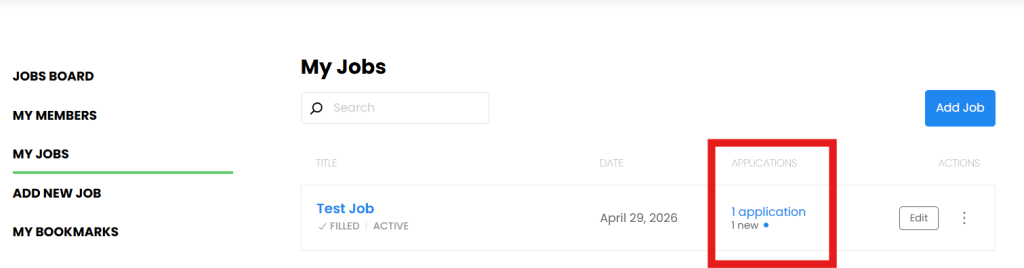
Go to My Jobs in your Farmer Assist account.
Click the blue Applications link for the relevant job.
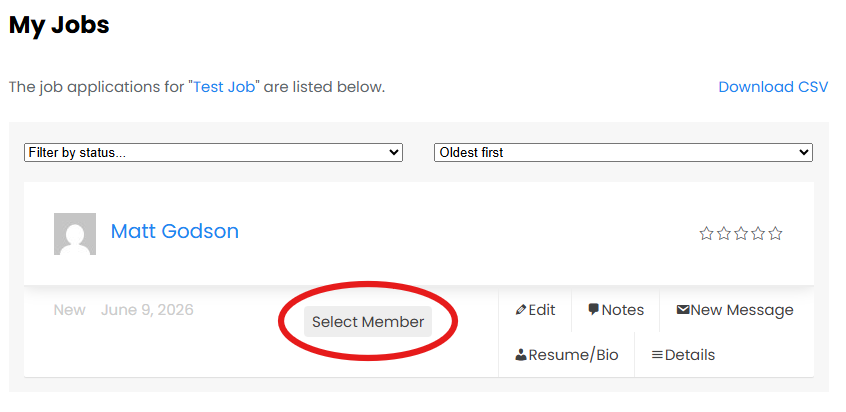
Review the applications, including each volunteer’s Bio/Resume and any messages.
Click Select Member beside the volunteer or volunteers you wish to select.
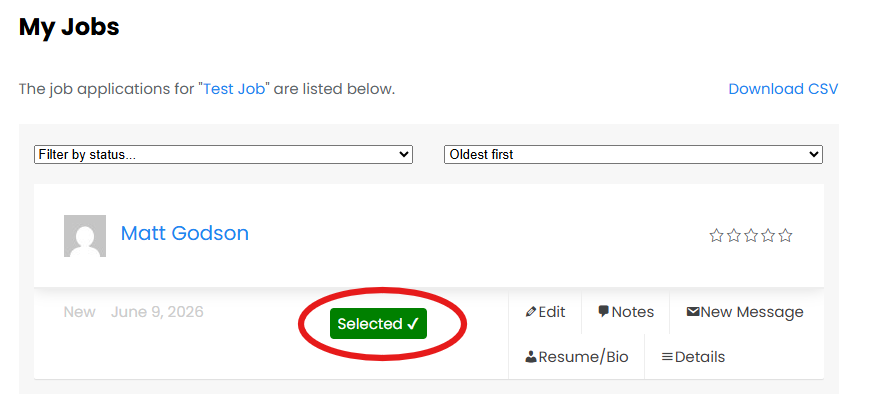
The Select Member button will turn green to confirm that the volunteer has been selected.
What happens when you select a volunteer?
When you select a volunteer, Farmer Assist automatically sends them an email confirming their selection.
This email includes:
Your job title and approximate location.
Your full name.
Your registered contact phone number and email address.
A link to your job listing.
Once selected, volunteers can contact you directly by telephone or email to discuss your pest management requirements, suitable dates and arrangements for accessing your property.
You may also contact selected volunteers directly if you prefer to initiate the discussion.
Important: Selecting a volunteer does not automatically authorise them to enter your property or commence activities. All arrangements, including property access, safety requirements and any necessary inductions, should be discussed and agreed upon before work begins.
What if you select someone by mistake?
If you accidentally select a volunteer, you can click the green Selected button again to deselect them.
However, please be aware that the initial selection email is sent immediately, including your contact details. Deselecting a volunteer does not recall that email.
If a volunteer has been selected in error, we recommend contacting them to clarify the situation.
Once you have selected your volunteers
When you have selected the volunteers you intend to work with and no longer require additional applications, please mark your job as Filled.
This helps keep the Farmer Assist Jobs Board current and allows program administrators to monitor volunteer participation and compliance.